

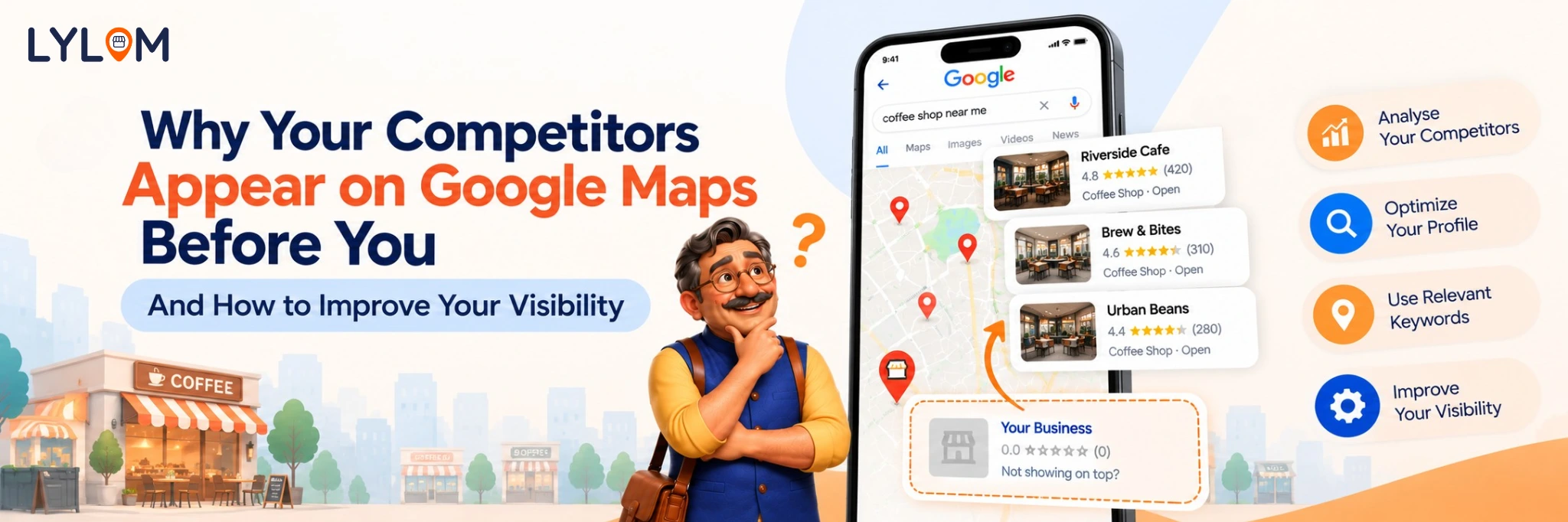
Imagine you own a salon, clinic, restaurant, or retail shop. You search Google Maps for your business category, only to find that competing businesses appear before yours.
It can be frustrating, especially when you offer similar services and serve the same area.
However, appearing lower on Google Maps does not automatically mean your business is doing something wrong. Google considers several factors when determining local search results, and those results can change depending on the searcher's location and search terms.
The good news is that you can take practical steps to strengthen your business information and online presence.
How Does Google Decide Which Businesses Appear First?
Google explains that local results are primarily based on three key factors:
1. Relevance
Relevance describes how well a business matches what someone is searching for. For example, a search for “paediatric dentist” is more specific than a search for “dentist.” Businesses with accurate categories and relevant service information may be better matches for specific searches.
Relevance describes how well a business matches what someone is searching for. For example, a search for “paediatric dentist” is more specific than a search for “dentist.” Businesses with accurate categories and relevant service information may be better matches for specific searches.
2. Distance
Distance refers to how far each potential result is from the location specified in the search or inferred from the searcher's location. A nearby competitor may appear before your business simply because the person searching is closer to them.
Distance refers to how far each potential result is from the location specified in the search or inferred from the searcher's location. A nearby competitor may appear before your business simply because the person searching is closer to them.
3. Prominence
Prominence relates to how well-known a business is. Google may consider factors such as information about the business across the web, links, and reviews.
Prominence relates to how well-known a business is. Google may consider factors such as information about the business across the web, links, and reviews.
There is no guaranteed shortcut to the top position, and businesses cannot pay Google for a better local ranking.
7 Reasons Your Competitors May Be More Visible
Understanding why other listings rank higher can help you identify practical areas to improve:
1. Their Business Categories Are More Relevant
Your competitor may have selected a category that better matches the customer's search. Review your primary category and choose the most accurate option for your business. Add relevant secondary categories only where appropriate.2. Their Profiles Contain More Complete Information
A competitor may have accurate hours, contact details, services, photos, and other useful information. Completing your profile helps customers understand your business and can improve how relevant your listing is to their needs.3. They Have More Customer Reviews
Reviews can influence customer trust and contribute to a business's online prominence. Encourage genuine feedback from customers and respond professionally. Do not purchase reviews or attempt to manipulate ratings. A larger review count alone does not guarantee a higher position.4. They Have a Stronger Website
A useful website can provide more detail about your services, locations, expertise, and business information. Make sure your website works well on mobile devices, loads reliably, and gives visitors clear ways to contact you.5. They Keep Their Information Accurate
Incorrect phone numbers, outdated hours, and missing service information create a poor customer experience. Review your details regularly, particularly during holidays, seasonal changes, and changes to your services.6. They Are Closer to the Searcher
This is a particularly important point for local businesses. A competitor may rank higher in one neighbourhood but lower in another. Do not evaluate your local visibility from only one search on one device. Search results vary by location and query.7. They Monitor Their Online Presence
Businesses that regularly review their profile information, customer feedback, and performance insights may identify problems earlier. Consistency helps you understand what needs attention, even though activity alone does not guarantee improved rankings.
How to Improve Your Google Maps Visibility
Start by checking your Google Business Profile for incorrect or missing information. Confirm your category, contact details, opening hours, website, and services.
Next, build a simple review process. Ask satisfied customers for honest feedback and respond thoughtfully to the reviews you receive.
Add current, genuine photos that show your products, premises, team, or work. Update your website with helpful service information and accurate contact details.
Finally, monitor your profile performance and evaluate your visibility for relevant searches over time. Look for patterns rather than expecting immediate changes.
How Competitor Analysis Helps
Competitor analysis can help you understand how other businesses present themselves online.
Review their publicly available categories, service offerings, websites, customer feedback, and photos. Look for opportunities to communicate your own strengths more clearly.
Avoid copying their content or making assumptions about their ranking strategy. Focus on making your business more useful and relevant to your own customers.
How LYLOM Supports Local Business Visibility
LYLOM offers tools designed to make Google Business Profile management easier for local business owners.
With features such as profile audits, visibility tracking, nearby competitor analysis, review management, and AI-powered content generation, you can organize important tasks and monitor areas that may need attention.
Instead of managing every activity separately, you can use LYLOM to simplify your regular profile management workflow.
Conclusion
If your competitors appear before you on Google Maps, start by understanding the reasons rather than immediately changing everything.
Check relevance, business information, reviews, website quality, and your actual service area. Monitor results over time and prioritize improvements that benefit customers.
Want a simpler way to monitor and manage your business profile? Explore LYLOM and take a more organized approach to local visibility.
Check relevance, business information, reviews, website quality, and your actual service area. Monitor results over time and prioritize improvements that benefit customers.
Want a simpler way to monitor and manage your business profile? Explore LYLOM and take a more organized approach to local visibility.